

2026年 2月 10日
宝塔面板环境下 Nginx + PHP-FPM + WordPress 的 FastCGI Cache 全流程配置

FastCGI Cache 简介
FastCGI Cache 是 Nginx 自带的页面级缓存机制,通过缓存 PHP 渲染后的 HTML,让 WordPress 页面直接由 Nginx 返回,绕过 PHP 和数据库,大幅降低 TTFB。
适用环境:
- 宝塔面板
- Nginx
- PHP-FPM(如 PHP 8.2)
- WordPress
一、创建 FastCGI 缓存目录
SSH 或宝塔终端执行:
Bash
mkdir -p /www/cache
chmod -R 777 /www/cache二、在站点配置中加入缓存路径(server{} 外)
打开宝塔 → 网站 → 设置 → 配置文件 在最顶部加入:
Bash
fastcgi_cache_path /www/cache levels=1:2 keys_zone=WORDPRESS:100m inactive=60m max_size=1g;
fastcgi_cache_key "$scheme$request_method$host$request_uri";含义:
- keys_zone=WORDPRESS:100m:缓存索引占用 100MB
- inactive=60m:60 分钟无人访问自动清理
- max_size=1g:最大缓存 1GB
三、在 server{} 内加入缓存控制逻辑
放在任意位置(但必须在 PHP 处理段之前):
Bash
set $skip_cache 0;

# 不缓存后台与登录
if ($request_uri ~* "/wp-admin/|/wp-login.php") {
    set $skip_cache 1;
}

# 不缓存带参数的请求(如 ?s= 搜索)
if ($query_string != "") {
    set $skip_cache 1;
}

# 不缓存已登录用户
if ($http_cookie ~* "wordpress_logged_in") {
    set $skip_cache 1;
}四、修改 PHP 处理段(enable-php-82.conf)
宝塔把 PHP 配置拆分到了独立文件,需要单独编辑。
路径: /www/server/nginx/conf/enable-php-82.conf
找到:
Bash
location ~ [^/]\.php(/|$)
{
    try_files $uri =404;
    fastcgi_pass  unix:/tmp/php-cgi-82.sock;
    fastcgi_index index.php;
    include fastcgi.conf;
    include pathinfo.conf;
}修改为:
Bash
location ~ [^/]\.php(/|$)
{
    try_files $uri =404;

    # FastCGI Cache 控制
    fastcgi_cache_bypass $skip_cache;
    fastcgi_no_cache $skip_cache;

    fastcgi_cache WORDPRESS;
    fastcgi_cache_valid 200 301 302 60m;
    add_header X-Cache $upstream_cache_status;

    fastcgi_pass  unix:/tmp/php-cgi-82.sock;
    fastcgi_index index.php;
    include fastcgi.conf;
    include pathinfo.conf;
}
注意:
- 缓存指令必须放在 fastcgi_pass 之前
- 不能删除原有的 try_files、fastcgi_pass、include
五、确保 WordPress 伪静态正常
宝塔伪静态文件 /www/server/panel/vhost/rewrite/站点.conf 应包含:
Bash
location / {
    try_files $uri $uri/ /index.php?$args;
}否则 WordPress 路由会异常。
六、重启 Nginx
宝塔 → 服务 → Nginx → 重启(不是重载,必须重启)
七、验证缓存是否生效
浏览器打开任意文章 → F12 → 网络 → 标头 找到:
Bash
X-Cache: HIT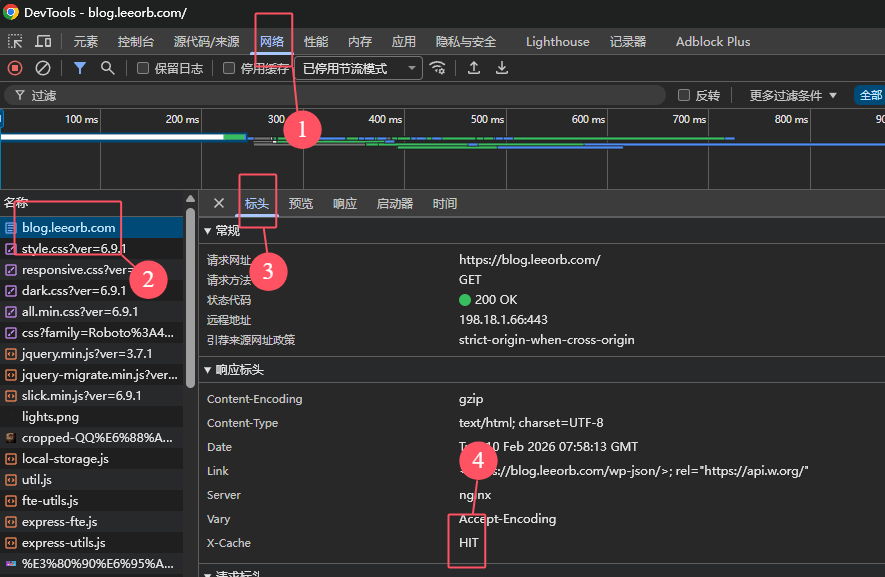
说明缓存命中。 第一次访问是 MISS,第二次刷新应变成 HIT。
八、推荐安装缓存清理插件
WordPress 更新文章后需要自动清理缓存。
推荐插件: Nginx Helper 功能:
- 文章更新自动清理缓存
- 首页、分类页自动清理
- 手动一键清理
九、FastCGI Cache 的性能收益
- TTFB 从 500–1200ms → 20–80ms
- PHP-FPM 压力下降 70%
- 数据库查询减少 90%
- 页面加载速度显著提升